Hetzner
Buy Hetzner Account
Strong price-to-performance ratios, European data centers, and generous traffic allowances on many plans.
From $50
3 options
Accessing reliable European cloud infrastructure has become essential for teams that value performance, data sovereignty, and predictable costs.
Independent listing. Prices shown are the marketplace prices for each option; the provider's own usage charges apply separately under its terms.
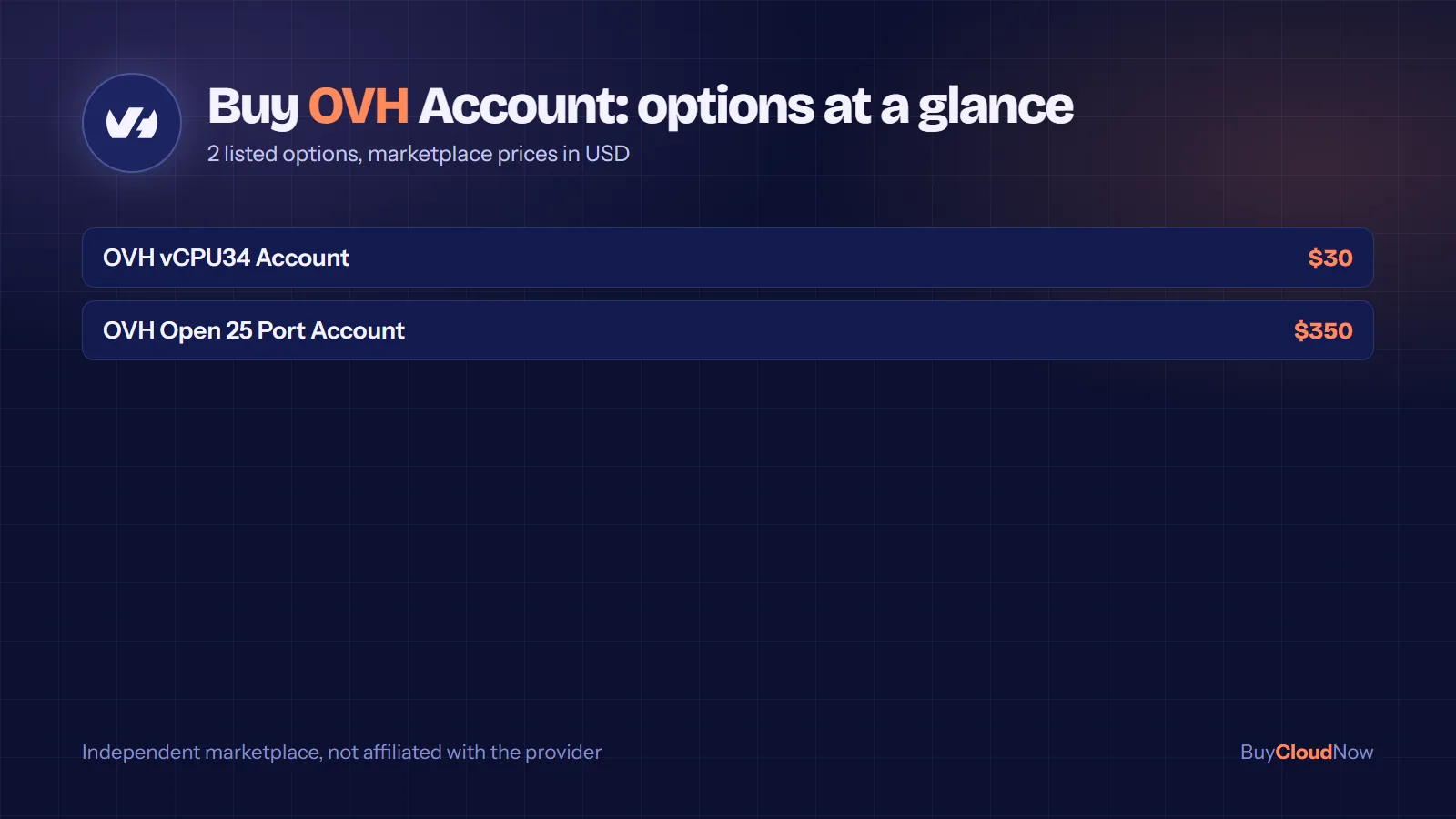
Buy OVH Account listings cover two options: a vCPU34 Account at $30 and an Open 25 Port Account at $350, both giving access to OVHcloud infrastructure across VPS, dedicated servers and public cloud.
OVHcloud is a common choice for European data residency and a broad product range. Below you will find what each option means and how to get started after access is confirmed.
These are the 2 options currently listed for Buy OVH Account, with the marketplace price for each. Prices are in US dollars and apply to the listing itself; the provider’s own usage charges apply separately under its terms of service.
Select an option in the purchase panel at the top of this page to see its price update, then add it to the cart. If you need a configuration that is not listed, message the team through the contact page.
Accessing reliable European cloud infrastructure has become essential for teams that value performance, data sovereignty, and predictable costs. When you decide to Buy OVH Account, you open the door to a mature ecosystem of virtual private servers, dedicated hardware, public cloud instances, and specialized computing resources. BuyCloudNow.com helps developers, startups, agencies, researchers, and SaaS teams obtain ready-to-use access so they can focus on building rather than navigating lengthy registration hurdles.
OVHcloud operates extensive data centers across Europe, North America, and other regions. Its offerings range from entry-level virtual machines to high-performance dedicated servers and GPU-accelerated instances. Many professionals prefer an established OVH Account for Sale option when they need immediate control panel access, verified credentials, or accounts already prepared for specific workloads. This page explores the practical reasons people choose this route, the types of services available once access is secured, important considerations before purchasing, and answers to common questions.
OVHcloud is a long-standing European provider known for designing and operating its own servers and network infrastructure. Customers manage services through a centralized control panel that covers billing, security settings, resource deployment, and support tickets. Creating a new account normally requires a valid email, personal or company details, and acceptance of terms. For some users—especially those outside certain regions, teams needing multiple isolated environments, or projects with tight deadlines—the ability to Buy OVH Account simplifies the starting process.
Once you have access, the same account can host a wide variety of resources. You can spin up virtual private servers for web applications, provision bare-metal machines for latency-sensitive workloads, or launch public cloud instances billed by the hour. Specialized options include GPU resources for machine learning experiments and storage solutions that integrate with the rest of the platform. Having a functional OVHcloud Cloud Account means you can move between these services without creating separate logins for every product line.
The control panel itself supports multi-factor authentication, IP restrictions, and user management features that let teams share access securely. Billing is generally transparent, with options for hourly public cloud usage or monthly commitments on dedicated hardware. Understanding these basics helps buyers evaluate whether a ready account aligns with their technical and operational needs.
Several practical motivations drive interest in an OVH Account for Sale. Startups often need to test applications in a European data center to meet latency or compliance goals without waiting through full verification cycles. Agencies managing client projects may require isolated environments that remain separate from their primary accounts. Researchers and development teams sometimes prefer accounts that already contain promotional credits or are pre-configured for specific regions.
Another common scenario involves users who previously encountered payment method restrictions or regional limitations. In those cases, purchasing a prepared account allows them to begin provisioning resources sooner. BuyCloudNow.com focuses on connecting such customers with options that match their intended use—whether that is a basic hosting setup, a development sandbox, or a production-ready environment.
When evaluating an OVH Account for Sale, consider the intended workload. A simple content site may only need a lightweight virtual server, while a data pipeline or AI training job could benefit from GPU-capable resources. The account itself is the gateway; the real value comes from the services you deploy afterward.
Many customers begin with virtual private servers. An OVHcloud VPS Account provides isolated virtual machines with dedicated CPU, memory, and storage allocations. These instances suit websites, application backends, development environments, and small-scale production systems. Bandwidth is typically generous, and daily backups are often available as an option.
For those specifically looking to Buy OVHcloud VPS Account, the appeal lies in rapid deployment and straightforward scaling. You can start with modest resources and increase capacity as traffic grows. The underlying platform uses modern processors and solid-state storage, delivering consistent performance for most common workloads. Root or administrator access lets you install any compatible operating system and software stack.
Teams that need more isolation or predictable performance sometimes combine VPS instances with private networking features. This approach keeps inter-server traffic off the public internet and can improve both security and speed for multi-tier applications.
When virtualization overhead becomes a concern, dedicated hardware becomes attractive. An OVHcloud Dedicated Server Account grants full control over a physical machine. You choose the processor generation, memory configuration, storage layout, and network options. These servers are popular for high-traffic websites, game servers, databases requiring consistent I/O, and any workload where neighboring tenants could affect performance.
An OVHcloud Server Account in this category often includes options for additional IP addresses, private networking, and hardware monitoring tools. Installation of custom operating systems or hypervisors is supported, giving advanced users the freedom to build specialized environments. Because the hardware is exclusive, resource contention is eliminated—an important factor for latency-sensitive or resource-intensive applications.
Public cloud resources operate on a pay-as-you-go model. An OVHcloud Cloud Account can host general-purpose, compute-optimized, or memory-optimized instances that scale with demand. Object storage, block storage, and load-balancing services integrate directly with these instances. Hourly billing makes the platform suitable for temporary workloads, continuous integration pipelines, or applications with variable traffic.
An OVHcloud Infrastructure Account extends this flexibility by allowing users to combine compute, storage, and networking components into custom architectures. Private networks (often called vRack) let you connect resources across data centers or product lines while keeping traffic isolated. This capability supports hybrid setups that mix dedicated servers with public cloud instances.
Machine learning, rendering, and scientific computing frequently require GPU acceleration. An OVHcloud GPU Account provides access to instances equipped with modern NVIDIA cards. These resources can dramatically reduce training times for neural networks or speed up parallel processing tasks. Availability varies by region, so confirming location options before deployment is advisable.
Because GPU instances are billed according to usage, they pair well with accounts that already contain credits or have flexible payment methods. Researchers and AI teams often value the ability to experiment without long-term hardware commitments.
Traditional web hosting remains available alongside more advanced infrastructure. An OVHcloud Hosting Account can support multiple websites, email services, and databases under a single management interface. For users who prefer managed environments rather than full server administration, these plans reduce operational overhead while still benefiting from the broader OVHcloud network.
An OVHcloud Cloud Hosting Account typically combines the convenience of shared or managed hosting with the option to upgrade into virtual or dedicated resources later. This path suits agencies and freelancers who manage multiple client sites and want a consistent platform.
Obtaining an account through a specialized provider can reduce the time between decision and first deployment. Instead of completing every registration step, verifying identity details, and configuring payment methods from scratch, users receive credentials and can begin exploring the control panel almost immediately. For time-sensitive projects this difference matters.
Security practices remain the buyer’s responsibility after delivery. Changing the initial password, enabling two-factor authentication, reviewing authorized IP ranges, and setting up proper user roles are essential first steps. A well-prepared OVHcloud Account Online should allow these security enhancements without restriction.
Another advantage is the potential inclusion of promotional balances. An OVHcloud Account with Credits can offset early usage costs, giving new users room to test configurations before committing larger budgets. Credits are typically applied to public cloud resources and should be verified for validity period and eligible services.
Teams that operate across multiple regions sometimes maintain separate accounts for isolation or compliance reasons. Having the option to Buy OVH Account for each environment simplifies that strategy. The same principle applies to development, staging, and production separations within a single organization.
Clarify the primary purpose of the account. Will it mainly host websites, run continuous integration jobs, support AI experiments, or serve as a general development playground? Matching the account type to the workload prevents under- or over-provisioning later.
If virtual servers are the priority, confirm that the account supports the regions and instance sizes you need. For dedicated hardware, check processor generations, memory limits, and available storage options. GPU users should verify which accelerator models and data-center locations are accessible.
Request clear information about whether the account is newly created or has prior activity. Fresh accounts may require additional verification steps for certain high-value services, while aged accounts sometimes carry existing payment history or configurations. Understanding the starting state helps set realistic expectations.
Delivery typically includes the control panel login, associated email or NIC handle, and any temporary passwords. Immediately after receiving these details, update the password and enable multi-factor authentication. Review any pre-configured users or contacts and remove those that are no longer needed.
Confirm how future invoices will be paid. Some accounts arrive with payment methods already attached; others require the new owner to add their preferred cards or alternative methods. Understanding the billing currency and tax treatment in the account’s region avoids surprises.
Official support remains available through the control panel once the account is active. Familiarize yourself with the ticket system, knowledge base, and community resources. Third-party sellers generally do not replace official support channels for technical issues related to the infrastructure itself.
An OVHcloud Account for Developers often serves as a flexible sandbox. Developers can deploy test environments, experiment with container orchestration, or host personal projects without affecting primary work accounts. The combination of VPS and public cloud options covers most experimental needs.
Early-stage teams frequently need European infrastructure for latency or regulatory reasons. Acquiring an account lets them launch minimum-viable products quickly while preserving budget for product development rather than administrative overhead.
Agencies managing websites or applications for multiple clients benefit from isolated environments. Separate accounts reduce the risk of one client’s traffic or configuration affecting another. An OVHcloud Cloud Server Account can host staging and production instances side by side with clear separation.
GPU resources and large-scale storage make OVHcloud attractive for computational research. An account with appropriate credits or payment flexibility allows researchers to run short-term experiments without long procurement cycles.
Product teams building multi-tenant applications often use a mix of dedicated servers for core services and public cloud instances for elastic components. Having a reliable OVH Cloud Account simplifies the management of these hybrid architectures.
Different account configurations emphasize different strengths. A general-purpose OVH Cloud Server Account may prioritize ease of use and broad service availability. An OVHcloud Compute Account focuses more heavily on virtual machines and scalable compute. An OVHcloud Infrastructure Account tends to support complex networking and multi-service designs.
When the goal is traditional website delivery, an OVHcloud Hosting Account or OVHcloud Cloud Hosting Account may be sufficient. For maximum control and performance, an OVHcloud Dedicated Server Account or OVHcloud Server Account provides exclusive hardware. GPU-oriented work points toward an OVHcloud GPU Account.
Buyers who need ready access without building everything from zero often search for an OVH Account for Sale or choose to Buy OVHcloud Account. Those specifically targeting virtual servers look to Buy OVHcloud VPS Account or an OVHcloud VPS Account. Users who want promotional balances seek an OVHcloud Account with Credits.
After credentials arrive, the first actions should focus on security and orientation. Log in to the control panel, change the password, and enable two-factor authentication. Review the account profile for accuracy and update contact information if necessary.
Next, explore the available product catalogs. Create a public cloud project if you plan to use on-demand instances. Order a VPS or dedicated server according to your requirements. Configure networking—public IPs, private networks, and firewalls—before deploying applications.
Monitor initial usage closely. Public cloud resources generate hourly charges; dedicated servers usually bill monthly. Set up billing alerts or review usage dashboards regularly. Document the configurations you create so that team members can maintain consistency.
As projects mature, consider additional services such as object storage for backups, load balancers for high availability, or managed databases to reduce operational load. The same account can grow with these additions.
OVHcloud provides public IPv4 and IPv6 addresses, private networking options, and additional failover IPs. Understanding how these components interact helps design resilient architectures. Private networks are particularly useful for connecting multiple servers without exposing traffic to the public internet.
Local NVMe storage on many instances delivers high performance for databases and temporary data. Block storage volumes can be attached and moved between instances. Object storage serves static assets and long-term archives. Choosing the right storage type for each data category improves both cost efficiency and performance.
Beyond account-level authentication, implement instance-level security: keep operating systems updated, restrict SSH or RDP access, use firewalls, and apply the principle of least privilege for any additional users. Regular reviews of open ports and installed software reduce risk.
Automated daily backups are available for many VPS and public cloud instances. Dedicated servers may require custom backup strategies using additional storage or third-party tools. Test restoration procedures periodically so that recovery remains reliable when needed.
Built-in monitoring tools provide basic metrics. For deeper insight, many teams deploy additional agents or integrate with external observability platforms. Early visibility into resource utilization helps prevent performance degradation and unexpected costs.
It means obtaining credentials for an existing or newly prepared OVHcloud customer account so you can log into the control panel and order services. The process is intended to accelerate access compared with starting a brand-new registration in certain situations.
No. The account is the management identity. After receiving access you still order and pay for the actual VPS, dedicated servers, public cloud resources, or other products you need.
Many users maintain multiple accounts for separation of projects, clients, or environments. Additional accounts are common among agencies and development teams.
Some prepared accounts arrive with promotional balances that can be applied toward eligible public cloud usage. The exact amount and validity should be confirmed at the time of purchase.
It emphasizes virtual private servers as the primary resource type. You still have access to the broader catalog, but the account is often selected by users whose main need is flexible virtual machines.
Verify region availability, instance sizes, bandwidth allocations, and backup options. Immediately secure the login credentials and enable multi-factor authentication.
Yes, when the underlying hardware or virtual resources match the performance and reliability requirements of the application. Dedicated servers and higher-tier virtual instances are frequently used in production.
It serves as a general-purpose gateway to both virtual and physical server offerings, suitable for mixed workloads that may evolve over time.
When you need exclusive hardware, consistent performance without virtualization overhead, or specific configurations that are difficult to achieve on shared platforms.
Many hosting plans allow multiple sites, email accounts, and databases under one management interface, making them convenient for agencies and multi-site operators.
Machine learning training, inference, 3D rendering, scientific simulations, and other parallel computing tasks that accelerate significantly with GPU hardware.
It often provides a pathway from simpler managed hosting into more advanced cloud resources while remaining within the same overall platform.
You receive login details—usually a control panel URL, username or NIC handle, and password—via the delivery method specified by the seller. Use those credentials to sign in and begin management.
Compute-focused accounts prioritize virtual machines and scalable processing resources, ideal for application servers, batch jobs, and development environments.
When you plan to design multi-service architectures involving private networking, multiple instance types, storage layers, and potentially hybrid dedicated-plus-cloud setups.
It provides a flexible environment for experimentation, continuous integration, and personal or team projects without interfering with production systems.
The shorter phrasing simply refers to an account on the OVHcloud platform. Functionally it grants the same control panel access as longer-named variants.
Yes. Depending on the resources ordered, the same account can support web hosting, application servers, databases, and additional services.
Delivery timelines vary by provider. Reputable sellers aim for prompt credential transfer so that buyers can begin using the control panel shortly after payment confirmation.
Availability of specific instance types, regions, or GPU models can depend on stock and the account’s verification status. Review the catalog inside the control panel for current options.
Use these pages to compare providers, read background guides, and check the questions other buyers ask before deciding to buy ovh account.
For platform features, quotas and current provider terms, the authoritative source is the official OVHcloud documentation. Buy Cloud Now is an independent marketplace and is not affiliated with the provider.
Choosing to Buy OVH Account is a practical step for many professionals who need reliable European cloud resources without unnecessary delay. Whether the priority is an OVHcloud VPS Account, an OVHcloud Dedicated Server Account, GPU capacity, or a flexible public cloud environment, the account serves as the foundation.
BuyCloudNow.com focuses on helping customers locate suitable options while encouraging responsible use of the platform. After acquisition, invest time in securing the account, understanding billing, and aligning resources with actual project requirements. This approach maximizes the value of the infrastructure and supports long-term success.
When you are ready to proceed, review the available offerings, confirm the details that matter most to your use case, and complete the purchase through the channels provided. With credentials in hand, the full range of OVHcloud services becomes accessible, allowing you to build, test, and scale according to your own schedule and technical goals.
The combination of European data-center presence, transparent pricing structures, and a broad product catalog continues to attract developers, businesses, and technical teams. An appropriately prepared account simply shortens the path from intention to operational infrastructure. Take the time to match the account characteristics to your workload, apply strong security practices from the first login, and leverage the platform’s strengths for the projects that matter to you.
Strong price-to-performance ratios, European data centers, and generous traffic allowances on many plans.
European data residency, developer-friendly tooling, and a mix of compute, storage, and related services.
Performance-focused infrastructure with European roots alongside global reach.
Short answers from the Cloud FAQ hub for this provider, with links to the full set.
All OVH questionsOVHcloud is a long-established European provider that designs and operates its own servers and network infrastructure, with data centers across Europe, North America and other regions. From one control panel you can order virtual private servers, bare-metal dedicated servers, hourly-billed public cloud instances, GPU resources and web hosting, and manage billing, security settings and support tickets in the same place.
Teams choose it when they want workloads inside European data centers for latency or data-sovereignty reasons, predictable pricing, and the ability to mix virtual and physical hardware without a second provider. The Buy OVH Account page lists the marketplace options, and Hetzner vs OVH vs Scaleway compares it with two other European providers.
The marketplace lists two OVH options. The OVH vCPU34 Account, at $30, is named for a vCPU figure: the account is described as carrying a compute quota of 34 virtual CPUs across running instances, which matters because new accounts normally start with small quotas. The OVH Open 25 Port Account, at $350, is defined by outbound port 25 being open, the port used for SMTP mail delivery, which providers commonly restrict on new accounts.
In both cases the account is the management identity; you still order and pay OVHcloud for the actual servers. Confirm the quota and any credits in the control panel after access, and keep usage within OVHcloud’s terms, particularly on email sending. See Buy OVH Account and the vCPU limits and quotas explainer.
Yes. OVHcloud organizes its catalog into product families, and a single customer account can hold services from several at once: virtual private servers for straightforward web applications, dedicated or bare-metal machines for latency-sensitive or isolation-heavy workloads, public cloud instances billed by the hour for elastic capacity, GPU instances for machine learning, and hosting plans for websites, email and databases.
Because everything sits under one identity, you can start with a VPS, add a dedicated server later and connect them through private networking without opening separate logins. Billing differs by family: public cloud is usage-based while dedicated hardware is usually a monthly commitment, so read each product’s terms. The OVHcloud product families guide walks through each one, and the Buy OVH Account page lists the current options.
First, check that the account can order what you need: region availability, instance sizes, bandwidth allocations and backup options for virtual servers, and processor generation, memory and storage choices for dedicated hardware. Availability of specific instance types, regions or GPU models can depend on stock and on the account’s verification status, so review the catalog inside the control panel rather than assuming.
Second, secure and normalize the account: change the password, enable multi-factor authentication, set IP restrictions if your team uses them, update contact and payment details to your own so invoices continue, and read OVHcloud’s terms of service on account ownership and acceptable use. The account handover checklist lists these steps in order, and the OVH account page lists the options.
Each group uses OVHcloud differently. Startups value hourly public cloud instances for early testing in a European data center, with the option to move steady workloads onto dedicated hardware as costs become predictable. Agencies keep client projects in isolated environments and appreciate hosting plans that support several websites, mailboxes and databases under one interface.
Research teams look at GPU instances and bare-metal machines for simulations or model training, while SaaS teams combine private networking, storage layers and mixed dedicated-plus-cloud setups. The common thread is a self-managed model: your team owns operating system maintenance, security and backups. Compare it with a hyperscale approach in hyperscale or developer-focused cloud, then see the Buy OVH Account listing.
Select an option above to add it to your cart, or message the team for a custom configuration.